
ProGit Chapter2 Git의 기초
사다리타기에서 걸렸다.. 정리해 본다. --2017-04-24
Git을 사용하는 방법을 알고 싶은데 한 챕터밖에 읽을 시간이 없다면 이번 챕터를 읽어야 한다.
뭐 완전 기본 내용이라.. 걸린게 더 나은 건지도..
1. Git 저장소 만들기
1.1. 기존 디렉터리를 Git 저장소로 만들기
git init
1.2. 기존 저장소를 Clone하기
지원하는 프로토콜: https://, git://, user@server:path/to/repo.git(ssh)
git clone https://github.com/libgit2/libgit2
git clone https://github.com/libgit2/libgit2 mylibgit
2. 수정하고 저장소에 저장하기
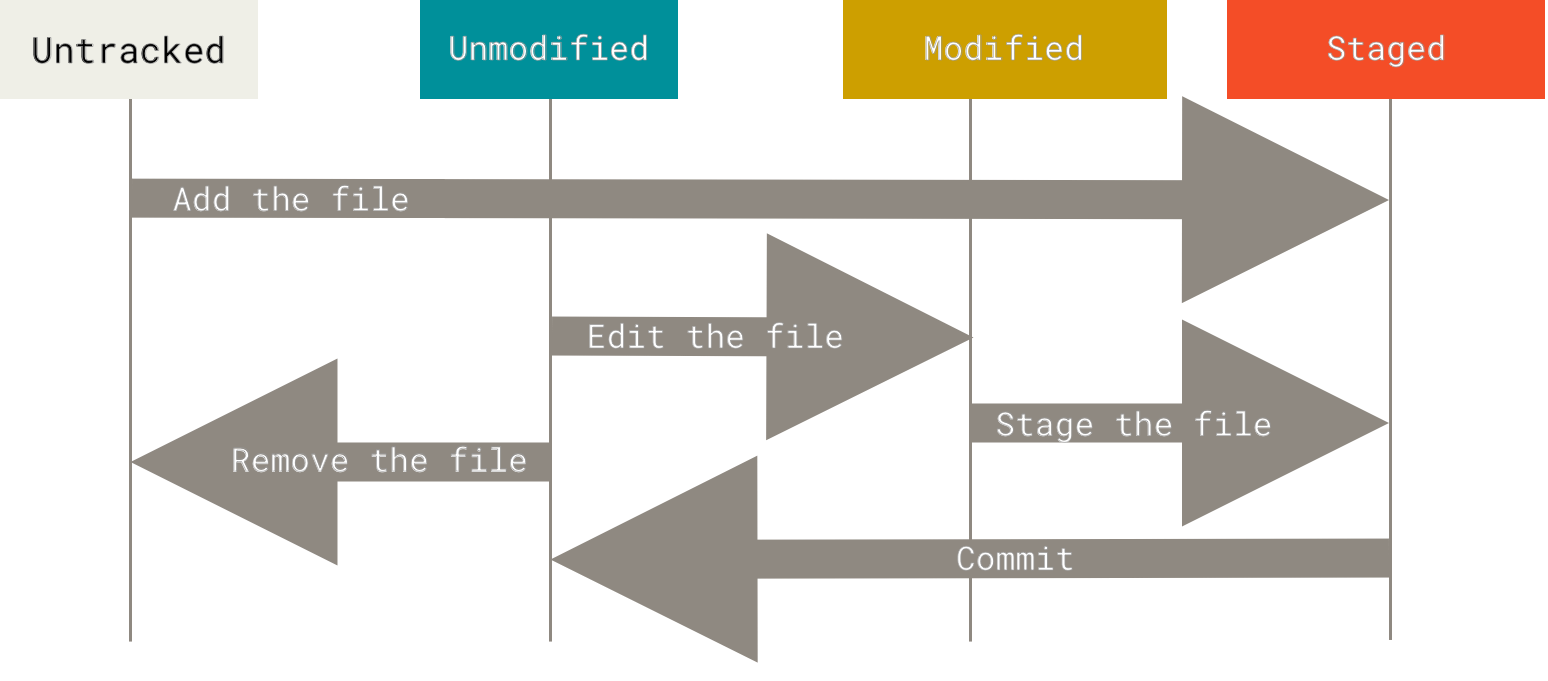
2.1. 상태
- Tracked - 관리대상임
- Unmodified - 수정하지 않음
- Modified - 수정함
- Staged - 커밋으로 저장소에 기록할 것
- Untracked - 관리대상 아님
2.2. 라이프사이클
2.3. 상태 확인
git status

# short
git status -s
git status --short
2.5. 파일 무시하기
.gitignore
- 규칙
- 빈줄, #으로 시작되면 무시
- 표준 Glob패턴 (ShellExpansion)
/로 시작되면 하위 폴더에 적용되지 않음- 디렉터리는
/를 끝에 붙여서 표현 !로 시작하는 패던의 파일은 무시하지 않음- https://github.com/github/gitignore
2.6. Staged와 Unstaged 상태의 변경 내용을 보기
git diff
git diff --staged2.8. Staging Area 생략하기
git commit -a -m "commit message"
2.9. 파일 삭제하기
git rm README.md3. 커밋 히스토리 조회하기
git log
git log -p               # includes diff
git log -2               # latest n commit
git log -p -2
git log --stat
git log --pretty=oneline
git log --pretty=short
git log --pretty=full
git log --pretty=fuller
git log --pretty=format:"%h - %an, %ar : %s"

git log --pretty=oneline --graph
git log --graph
3.1. 조회 제한조건
-<n>--since,--after--until,--before--author--comitter--grep- 커밋메시지의 텍스트 검색-S- 변경 내용의 테스트 검색
4. 되돌리기
4.1. 마지막 커밋의 내용을 포함하여, 새 커밋으로 덮어쓰기 (마지막 커밋 수정)
git commit --amend4.2. 파일 상태를 Unstage로 변경하기
git reset HEAD CONTRIBUTING.md
4.3. Modified 파일 되돌리기
git checkout -- CONTRIBUTING.md5. 리모트 저장소
5.1. 리모트 저장소 확인하기
git remote
git remote -v
5.2. 리모트 저장소 추가하기
git remote add pb https://github.com/paulboone/ticgit
5.3. 리모트 저장소를 Pull하거나 Fetch하기
git fetch pb

git fetch origin
git fetch

git pull origin
git pull
5.4. 리모트 저장소에 Push하기
git push origin master
git push
5.5. 리모트 저장소 살펴보기
git remote show origin
5.6. 리모트 저장소 이름을 바꾸거나 리모트 저장소를 삭제하기
git remote rename pb paul
git remote rm paul
6. 태그
6.1. 태그 조회
git tag
git tag -l 'v1.8.5*'
6.4. 나중에 태그하기
git tag -a v1.2 9fceb02
6.5. 태그 공유하기
git push는 태그를 자동으로 전송하지 않는다. 별도로 Push해야 함
git push origin tagname
git push origin --tags
6.6. 태그를 Checkout 하기
태그는 Checkout할 수 없으며, 태그가 가리키는 특정 커밋 기반의 브랜치를 만든다.
git checkout -b version2 v2.0.0
7. Git Alias
맘대로 alias를 만들어 쓸 수 있다.
git config --global alias.co checkout
git config --global alias.br branch
git config --global alias.ci commit
git config --global alias.st status

git config --global alias.unstage 'reset HEAD --'
git config --global alias.last 'log -1 HEAD'
git config --global alias.visual '!gitk'
8. See Also
8.1. Backlinks
8.2. Similar Pages
Similar pages by cosine similarity. Words after page name are term frequency.